Job tools ยท free

Free job tools for home-buying and wholesaling teams

Climbmark has 15 small tools for the work itself, such as a deal calculator, a visit walk sheet and a contract-to-close checklist. Each one opens in your browser with no sign-up and uses no AI. They are free on every plan.

What you type stays in your browser. A free account saves it and brings it to your other devices.

15 toolsNo sign-up to open oneNo AIFree on every plan

Show the tools for one job

All 15 tools are showing.

Talking with homeowners

For the people who reach homeowners first and keep in touch until a deal is ready.

Opener and voicemail cards

Three openers and two voicemails with your name, team and the house filled in.

You put in
The owner's first name, the house, your callback number and what they said last time.
You get
Three openers (inbound lead, cold call and callback) and two voicemails (first try and last try). Each one has your details filled in and a copy button.

Made for these jobs: Cold callerLead managerFollow-up specialist

Open the toolHow it works

Call notes summary

Six things every handoff needs, turned into a note to paste into your CRM.

You put in
The six things the next person needs: why they want to sell, timeline, condition, price in mind, who decides and next step.
You get
A dated note that is ready to paste into your CRM, and a list of what is still missing, so you can ask on the next call.

Made for these jobs: Lead managerFollow-up specialistCold callerAcquisitions rep

Open the toolHow it works

Objection library

The best answer to what sellers say, searchable, with your own lines added.

You put in
A word from what the seller said, such as "price" or "think about it".
You get
The best answer to that line from the daily drill, and why it works. The lines you saved in your playbook show up in the same search.

Made for these jobs: Lead managerCold callerFollow-up specialist

Open the toolHow it works

Follow-up planner

Every lead with a date and a reason to call, late ones first.

You put in
Each lead by first name or nickname, the next contact date, how you will reach them (call, text, email or letter), what changes by then and what to bring up.
You get
Your leads in date order with the late ones first, a count of what is due today, and a check-in text for each lead that you can copy.

Made for these jobs: Follow-up specialistLead managerCold caller

Open the toolHow it works

Call outcome tally

Dials, talks, handoffs, callbacks and stop requests, for today and the week.

You put in
One tap after each call: a dial, a talk with an owner, a lead handed on, a callback set or a request to stop.
You get
Counts for today and for the last 7 days, the share of dials that reached an owner, and a reminder to put every stop request on your do-not-call list. It keeps counts only, with no names or phone numbers.

Made for these jobs: Cold caller

Open the toolHow it works

At the house and the offer

From the walk-through to the number you put in front of the seller.

Visit walk sheet

Twelve parts of the house to check on the visit, with your estimate for each.

You put in
Twelve parts of the house: roof, heating and cooling, water heater, plumbing and eight more. For each part you set the condition (good, fair or needs work), your estimate and a short note.
You get
How many parts you checked, your repair estimate added up, and the list of what needs work. It prints.

Made for these jobs: Acquisitions repDeal analyst

Open the toolHow it works

Deal calculator

From after-repair value to the highest offer that still works, with every cost shown.

You put in
The after-repair value, the repairs, how many months you will hold the house and what each month costs, closing costs when you buy, selling costs, and the profit your team needs as a percent or a dollar amount.
You get
Highest offer that still works, with every cost on its own line. It warns you when the numbers do not work, and it points out a cost you left blank.

Made for these jobs: Deal analystAcquisitions repDispo rep

Open the toolHow it works

Offer talk prep

Your deal numbers turned into plain words that show the seller how the offer was made.

You put in
Nothing new. It uses the numbers you put in the deal calculator.
You get
A short talk that walks the seller through how the offer was made, one part at a time, with each number rounded to the nearest $500. It prints.

Made for these jobs: Acquisitions rep

Open the toolHow it works

Selling the deal

For matching a house to the right buyers and sending them facts they can check.

Buyer cards

What each buyer buys and where, then match a deal to the right few.

You put in
A card for each buyer, up to 40: the areas they buy in, their price range, what they buy, proof of funds, how fast they close and how they like deals sent.
You get
Type the area and the price of a deal, and the list narrows to the buyers who fit. The whole list downloads as a spreadsheet (CSV).

Made for these jobs: Dispo rep

Open the toolHow it works

Deal sheet writer and checker

House facts in, an honest deal sheet out, with missing facts flagged first.

You put in
Twelve facts about the house, from the area and the asking price to the comps, the repair estimate and any known problems.
You get
A plain deal sheet to copy and send. Before you send it, the checker flags what a buyer would ask about: a missing fact, a value with no comps behind it, a repair number with no scope, or hype words.

Made for these jobs: Dispo repDeal analyst

Open the toolHow it works

From contract to closing

For keeping each signed deal on track and each seller updated.

Contract-to-close checklist

Every step from signed contract to funded, per file, with days to closing.

You put in
A file for each signed deal, with its closing date and the day you last updated the seller. Then you tick off 13 steps, from "signed contract sent to the title company" to "closed and funded".
You get
Days to closing and steps done for each file, a reminder when the seller has not heard from you in 7 days, and a status update for the seller, the buyer or the title company that you can copy.

Made for these jobs: Transaction coordinatorAcquisitions rep

Open the toolHow it works

During the rehab

For choosing a contractor and paying for work once it is done.

Scope and bid compare

Line up contractor bids on the same scope and see gaps and missing lines.

You put in
The scope of work, one line for each piece (up to 20 lines), and what each contractor charges for each line. It compares up to three bids.
You get
A total for each bid, a flag where a contractor left a line without a price, and a flag where two prices for the same line are far apart. The cheapest bid gets a Lowest full bid mark, and only a bid that priced every line can get it.

Made for these jobs: Project managerDeal analyst

Open the toolHow it works

Payment schedule by stage

Stages, what counts as done, and what is paid after each check.

You put in
The contract total and the stages of the job. It starts with five stages, each with what counts as done and a percent of the total, and you can change them.
You get
The amount to pay after each stage is checked, and a warning when the stages do not add up to 100%. It prints.

Made for these jobs: Project manager

Open the toolHow it works

Running the team

For the person who coaches the reps and gets a new hire ready.

One-on-one plan

One skill a week per rep: what good sounds like, the practice and a check date.

You put in
For each rep: the one skill to work on, what good sounds like, the practice for the week and a check-in date.
You get
A short plan for each rep, with a line for how it went. It prints.

Made for these jobs: Team lead

Open the toolHow it works

New hire ramp plan

A 30-day plan from a start date: which levels each week and when to check.

You put in
The new hire's name, start date and job path.
You get
A 30-day plan with dates: the levels to play each week, a check-in at the end of each week and a ready check in the last one. It prints.

Made for these jobs: Team lead

Open the toolHow it works

More free tools are on this website itself. The address check: type a street address and see the code violations and building permits its city or county has published. It covers ten places so far. Will this deal close?: answer a few questions about one deal under contract and see what is slipping and who owns the next step. The lead note check: paste a call note and see which facts are missing. And the caller tryout kit: a two-week test for a new caller, VA, agency or AI caller.

A closer look

How the deal calculator gets to an offer

It starts from what the house should sell for once it is fixed up. Then it takes off every cost between today and that sale, and the profit the team needs. What is left is the most the team can pay.

A worked example of the deal calculator with sample numbers
LineSample amount
After-repair value$200,000
Repairs-$35,000
Holding (4 months at $1,200 a month)-$4,800
Closing costs when we buy-$3,000
Selling costs (8% of the value)-$16,000
Profit the team needs (12% of the value)-$24,000
Highest offer that still works$117,200

These are sample numbers. Use your own team's numbers for costs and profit, because every team's are different.

The calculator's own advice comes with the result: open a little under this number so there is room to move, and show the seller the parts, not only the total. Offer talk prep turns the same numbers into words for that talk.
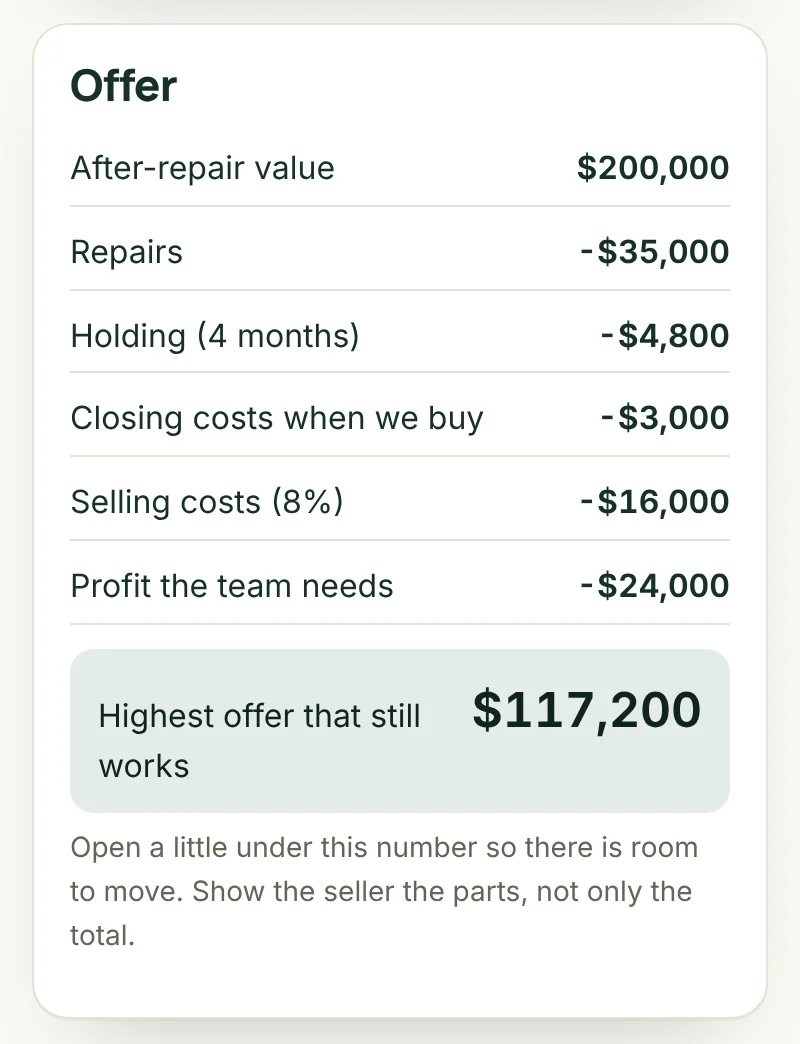
The deal calculator with sample numbers: each cost on its own line and the highest offer that still works
The deal calculator, with the sample numbers

Good to know

Before you type anything

No sign-up to start

Open a tool and use it. Until you sign in, what you type stays in your browser.

A free account keeps it

Signed in, your entries are saved to your account and follow you from your phone to your computer. Have an account already? Sign in before you start typing.

Private to you

Team leads and the business owner see practice results. They do not see what you type in a tool or save in your playbook.

Short on purpose

The tools take first names and short notes. Full records belong in your CRM, and the notes a tool writes are made to be pasted there.

Like the lessons, the tools are general. They are not legal advice, and steps differ by market, so a tool says where to check with your own title company or lawyer.

Questions

About the job tools

More answers are in the questions and answers.

Are the job tools free?

Yes. All 15 tools are on every plan, and that includes the free plan for 1 owner and up to 2 reps. Nothing in them is counted or capped by plan.

Do I need an account to use a tool?

No. A tool opens in your browser and works right away. Without an account, what you type stays in that browser. A free account saves it and brings it to your other devices. If you already have an account, sign in before you start, so your entries are saved to it.

Do the job tools use AI?

No. They are forms, checklists and arithmetic that run in your browser. Nothing you type in a tool is sent to an AI.

Who can see what I type in a tool?

It is kept with your own progress, and the app shows it to nobody else. Your team lead and the business owner see your practice results, such as levels passed and grades. They do not see your tool entries or your playbook.

Can I print or export my work?

Yes, where it helps. The visit walk sheet, one-on-one plan, offer talk prep, new hire ramp plan and payment schedule by stage print. Buyer cards download as a spreadsheet (CSV). Call notes, deal sheets, status updates and check-in texts copy with one tap, ready to paste into your CRM, an email or a text.

Do the tools replace my CRM?

No. They sit next to it. The tools take first names and short notes on purpose, and the notes and updates they write are made to be pasted into your CRM. Full records, phone numbers and documents belong there.

What is the highest offer that still works?

It is the most a team can pay for a house and still cover its costs and its profit. The deal calculator starts from the after-repair value and takes off repairs, holding costs, closing costs, selling costs and the profit the team needs. Many investors call this number the maximum allowable offer, or MAO.

How is the deal calculator different from the 70% rule?

The 70% rule is a shortcut: offer no more than 70% of the after-repair value, minus repairs. It rolls every other cost and the profit into one percent. The deal calculator puts each cost on its own line and uses your team's own numbers, so you can see where the offer comes from and show the seller.

Are the checklists right for my market?

They cover the steps most deals share. Rules and paperwork differ by market and by title company, so a tool says where to check with your own title company or lawyer. Like the lessons, the tools are general and are not legal advice.

Do the tools work on a phone?

Yes. They run in the web browser on a phone, a tablet or a computer, so the walk sheet can come to the house and the call tally can sit next to the dialer.

Try one on your next deal

Pick a tool, type in a real house or a real lead, and see if it earns a place in your day.