Job tool · free
Objection library: the best answer to what sellers say
Type a word from what the seller said, such as "price" or "think about it". The library shows the best answer to that line from the daily drill, and says why it works. Lines you saved in your playbook show up in the same search.
It opens in your browser with no sign-up. What you type stays in your browser until you make a free account.
What it does
What you put in, and what you get
The library holds 40 answers, sorted by ten skills. Each one is the best answer to a moment from the daily drill, with one line on why it works.
It is for the minute before a call, or the minute after one that went badly. Type the word the seller used, and read how to answer it next time.
- You put in
- A word from what the seller said, such as "price" or "think about it".
- You get
- The best answer to that line from the daily drill, and why it works. The lines you saved in your playbook show up in the same search.
What is in it
40 answers, sorted by ten skills
Search by a word the seller said, or by the name of a skill.
A worked example
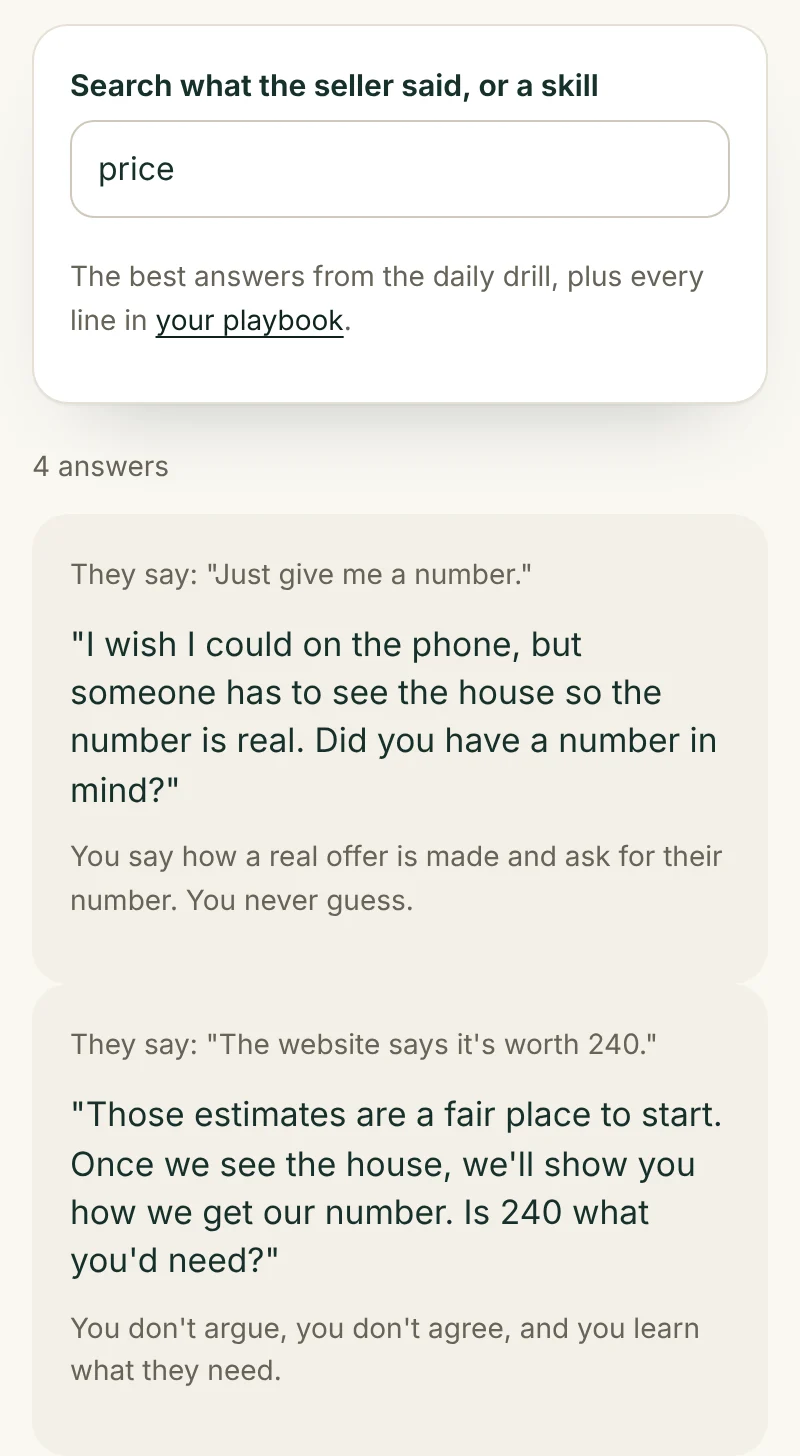
What a search for "price" gives
The library finds 4 answers for the word "price". Here are the first three.
"I wish I could on the phone, but someone has to see the house so the number is real. Did you have a number in mind?"
Why it works. You say how a real offer is made and ask for their number. You never guess.
"Those estimates are a fair place to start. Once we see the house, we'll show you how we get our number. Is 240 what you'd need?"
Why it works. You don't argue, you don't agree, and you learn what they need.
"Honestly, I don't know yet. That's what the visit is for. What would feel fair to you?"
Why it works. Honest, and it hands the number back to them.
The answers come from the daily drill in the app.
How to use it
How to use the objection library
Type a word
In Search what the seller said, or a skill, type one word from what the seller said, or the name of a skill.
Read the answer and the reason
Each result shows what the seller says, the best answer and one line on why it works.
Say it your way
Read why the answer works, then say it in your own words.
Add your own lines
A line you save in your playbook shows up in the same search, marked as yours.
Before you type anything
- It opens with no sign-up. Until you sign in, what you type stays in your browser.
- A free account saves it and brings it to your other devices. Have an account already? Sign in before you start typing.
- Your team lead and the business owner do not see what you type in a tool.
- It uses no AI. It is a form, a checklist or arithmetic that runs in your browser.
What it is not
- It is not a script to read out. Each answer comes with the reason it works, so you can say it your own way.
- It does not listen to your calls or grade them.
- It does not replace your CRM. Full records, phone numbers and documents belong there.
- Like the lessons, it is general. It is not legal advice, and steps differ by market.
Practice the talk
Use it on a made-up call
The objection library gets the facts ready. The call is where they get used. Play three turns with Curt, one of the made-up people in the app.
- The other person is made up and answers what you pick.
- Trust goes up or down, and a coach note says why after each line.
- No sign-up, and nothing you pick is saved.
Three turns from Cold calling 1, cold calls, on the cold calling path. Pick what you would say.
The job behind the tool
Made for a lead manager, a cold caller and a follow-up specialist
Climbmark is practice for the jobs on a home-buying or wholesaling team, and each of these jobs has a free path of short levels with practice calls.
Lead manager
For the person who answers new seller leads and books the visit.
See the lead manager pathCold caller
For callers and calling VAs who reach property owners first.
See the cold calling pathFollow-up specialist
For the person who works the leads that are not ready yet.
See the follow-up pathPractice the skill behind it. "Live lead ready" is level 2 of the lead manager path. Three chapters, about 50 to 65 minutes, and you can stop after any chapter. Sellers push back, go quiet and need time. Stay calm, set follow-ups people agree to, and hand the closer a clean picture.
Goes well with
Tools for the rest of the call
Plain answers that go with it:
Questions
About the objection library
More answers are in the questions and answers. You can also ask about lead management in the community.
What do I say when a seller says "Just give me a number"?
The library's answer is: "I wish I could on the phone, but someone has to see the house so the number is real. Did you have a number in mind?" Why it works: you say how a real offer is made and ask for their number. You never guess.
Where do the answers come from?
From the daily drill in Climbmark. A drill is one moment from a seller call with three ways to answer it. The library keeps the best one, with the reason it works.
Can I add my own answers?
Yes. Save a line in your playbook in the app, and it shows up in the same search, marked as yours.
Which objections does it cover?
Calls with sellers. The answers are sorted by ten skills: opening, motivation, timeline, condition, price, next step, lowball worry, follow-up, listening and who decides.
What if my search finds nothing?
Try one word in place of a sentence, such as "price" or "think".
Is the objection library free?
Yes. The objection library is on every plan, and that includes the free plan. It opens in your browser with no sign-up, and nothing in it is counted or capped.
Who can see what I type in the objection library?
Until you sign in, what you type stays in your browser. With a free account it is kept with your own progress, and the app shows it to nobody else. Your team lead and the business owner see practice results, such as levels passed. They do not see your tool entries.
Look up the line that stopped you
Type the word the seller used, and read how to answer it next time.