Job tool · free
Openers and voicemail scripts for calls to homeowners
Three openers and two voicemails for calls about a house. Fill in the owner's first name, the house and your callback number, and each one is ready to say or to copy.
It opens in your browser with no sign-up. What you type stays in your browser until you make a free account.
What it does
What you put in, and what you get
On a cold call you have about ten seconds to sound like a person, say why you are calling and make it easy to say yes or no. The cards give you those ten seconds, written out.
Your name and team come from your profile. Say it in your own words once it feels natural.
- You put in
- The owner's first name, the house, your callback number and what they said last time.
- You get
- Three openers (inbound lead, cold call and callback) and two voicemails (first try and last try). Each one has your details filled in and a copy button.
The scripts
The five scripts, word for word
The words in square brackets are filled in from what you type. Copy a card, or read it out loud a few times until it sounds like you.
The owner asked about selling, and you are calling them back.
Hi, is this [name]? This is [your name] with [your company]. You asked about selling the house on [street]. Is now an okay time for a few minutes?
The owner did not ask for your call.
Hi [name], this is [your name] with [your company]. We buy houses in the area, and I'm calling about the house on [street]. Have you thought about selling it?
You talked before, and they told you something to come back to.
Hi [name], it's [your name] with [your company]. Last time you mentioned [what they told you]. How is that going?
Nobody picks up, and it is your first message.
Hi [name], this is [your name] with [your company], about the house on [street]. Call or text me at [your number] when it suits you. If now isn't the time, no problem.
The last message you leave before you stop calling.
Hi [name], [your name] with [your company] again. I'll stop calling so I'm not a bother. If anything changes with the house on [street], I'm at [your number].
A worked example
The same cards, filled in
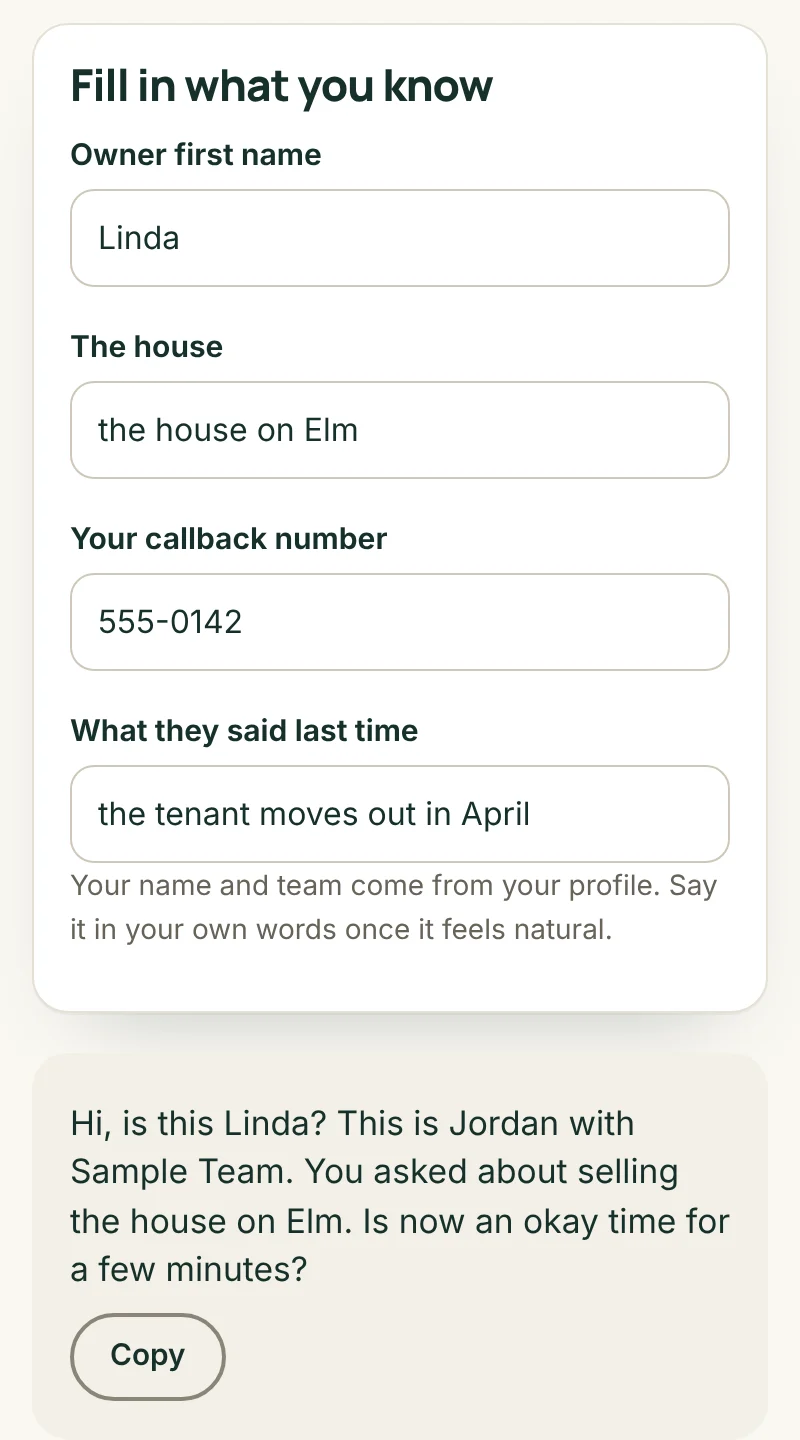
With made-up entries: owner first name "Linda", the house "the house on Elm", your callback number "555-0142", what they said last time "the tenant moves out in April". The caller is Jordan with Sample Team.
Hi Linda, it's Jordan with Sample Team. Last time you mentioned the tenant moves out in April. How is that going?
Hi Linda, this is Jordan with Sample Team, about the house on Elm. Call or text me at 555-0142 when it suits you. If now isn't the time, no problem.
The entries are made up. The picture of the tool on this page shows the same ones.
How to use it
How to use the opener and voicemail cards
Fill in what you know
Four boxes: Owner first name, The house, Your callback number and What they said last time.
Check your name and team
They come from your profile in the app. Until you add them, the cards show "[your name]" and "[your company]".
Pick the card for the call
An inbound lead, a cold call, a callback, or one of the two voicemails.
Say it your way
Copy the card or read it out loud. Once it feels natural, say it in your own words.
Before you type anything
- It opens with no sign-up. Until you sign in, what you type stays in your browser.
- A free account saves it and brings it to your other devices. Have an account already? Sign in before you start typing.
- Your team lead and the business owner do not see what you type in a tool.
- It uses no AI. It is a form, a checklist or arithmetic that runs in your browser.
What it is not
- It does not dial, text or leave the voicemail for you.
- It is the start of a call and not a whole script. After the opener, the conversation is yours.
- It does not know the calling rules where you work. Follow your team's call window and do-not-call list.
- It does not replace your CRM. Full records, phone numbers and documents belong there.
- Like the lessons, it is general. It is not legal advice, and steps differ by market.
Practice the talk
Use it on a made-up call
The opener and voicemail cards gets the facts ready. The call is where they get used. Play three turns with Barb, one of the made-up people in the app.
- The other person is made up and answers what you pick.
- Trust goes up or down, and a coach note says why after each line.
- No sign-up, and nothing you pick is saved.
Three turns from Cold calling 1, cold calls, on the cold calling path. Pick what you would say.
The job behind the tool
Made for a cold caller, a lead manager and a follow-up specialist
Climbmark is practice for the jobs on a home-buying or wholesaling team, and each of these jobs has a free path of short levels with practice calls.
Cold caller
For callers and calling VAs who reach property owners first.
See the cold calling pathLead manager
For the person who answers new seller leads and books the visit.
See the lead manager pathFollow-up specialist
For the person who works the leads that are not ready yet.
See the follow-up pathPractice the skill behind it. "The cold call opener" is level 1 of the cold calling path, and it needs no sign-up. Three chapters, about 45 to 55 minutes, and you can stop after any chapter. The owner did not ask for your call. You have about ten seconds to sound like a person, say why you are calling, and make it easy to say yes or no.
Goes well with
Tools for the rest of the call
Plain answers that go with it:
Questions
About the opener and voicemail cards
More answers are in the questions and answers. You can also ask about cold calling in the community.
What do I say when I cold call a homeowner?
Say who you are, say why you are calling, and ask one easy question. The cold call card reads: "Hi [name], this is [your name] with [your company]. We buy houses in the area, and I'm calling about the house on [street]. Have you thought about selling it?"
What should a voicemail to a homeowner say?
Keep it short: your name, your team, which house, and how to reach you. The first voicemail card reads: "Hi [name], this is [your name] with [your company], about the house on [street]. Call or text me at [your number] when it suits you. If now isn't the time, no problem."
What is the "last try" voicemail for?
It tells the owner you will stop calling, and it leaves your number in case anything changes. It reads: "Hi [name], [your name] with [your company] again. I'll stop calling so I'm not a bother. If anything changes with the house on [street], I'm at [your number]."
Can I change the words on the cards?
The cards fill in your details, and the words around them stay the same. The tool itself says to use your own words once a card feels natural. Lines of your own can be saved in your playbook in the app.
Do these scripts follow the calling rules where I work?
They are plain introductions, and they make no claims. Rules about who you may call, at what hours and what you must say differ by place, so follow your team's rules and your do-not-call list. This is not legal advice.
Is the opener and voicemail cards free?
Yes. The opener and voicemail cards is on every plan, and that includes the free plan. It opens in your browser with no sign-up, and nothing in it is counted or capped.
Who can see what I type in the opener and voicemail cards?
Until you sign in, what you type stays in your browser. With a free account it is kept with your own progress, and the app shows it to nobody else. Your team lead and the business owner see practice results, such as levels passed. They do not see your tool entries.
Have your first ten seconds ready
Fill in the owner and the house, and read the card out loud before you dial.