Job tool · free
Follow-up planner: a date and a reason for every lead
For every lead who said "not yet": the next contact date, how you will reach them and the reason to call. The planner puts the late ones first, counts what is due today and writes a short check-in text for each lead.
It opens in your browser with no sign-up. What you type stays in your browser until you make a free account.
What it does
What you put in, and what you get
The planner's rule is in its first line: Every lead gets a date and a reason to call. "Just checking in" is not a reason.
It takes first names or nicknames on purpose, and it holds up to 40 leads. Full records belong in your CRM.
- You put in
- Each lead by first name or nickname, the next contact date, how you will reach them (call, text, email or letter), what changes by then and what to bring up.
- You get
- Your leads in date order with the late ones first, a count of what is due today, and a check-in text for each lead that you can copy.
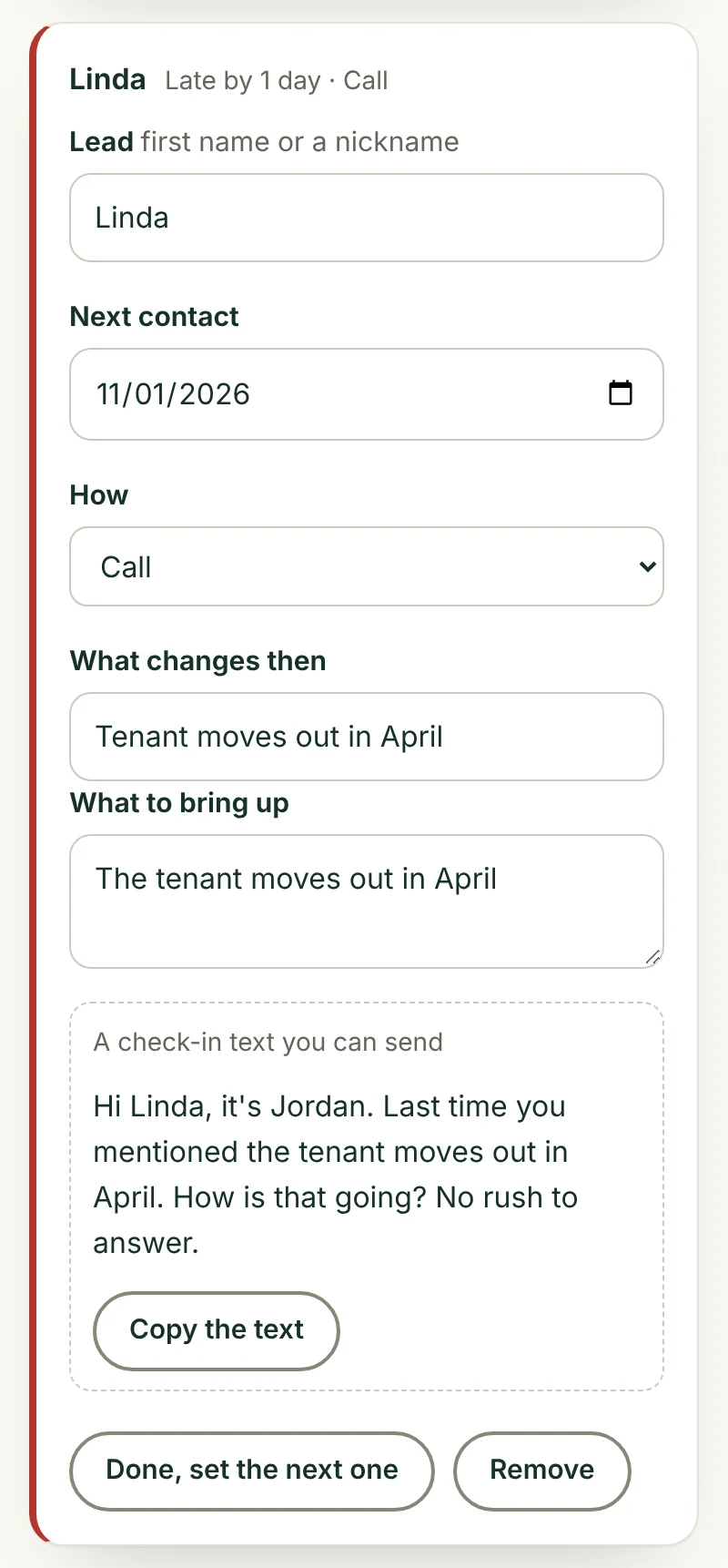
The card
What each lead gets
- Lead
- A first name or a nickname.
- Next contact
- The date you will reach out again.
- How
- Call, text, email or letter.
- What changes then
- What will be different for the seller on that date, such as a lease that ends.
- What to bring up
- Something they told you last time, in their own words.
A worked example
Three sample leads on a Monday morning
Made-up leads. The planner's first line for them reads: "2 follow-ups are due today or late."
Hi Linda, it's Jordan. Last time you mentioned the tenant moves out in April. How is that going? No rush to answer.
Hi Owen, it's Jordan. Last time you mentioned the listing with the agent ends this month. How is that going? No rush to answer.
Hi Carmen, it's Jordan. Last time you mentioned you wanted to talk it over with your brother. How is that going? No rush to answer.
The entries are made up. The picture of the tool on this page shows the same ones.
How to use it
How to use the follow-up planner
Add each lead who said "not yet"
Press Add a lead and type a first name or a nickname.
Give it a date and a way
Set Next contact and pick how you will reach them: call, text, email or letter.
Write the reason
What changes then is why that date matters to the seller. What to bring up is something they told you last time.
Work the list from the top
Late leads come first. Copy the check-in text or make the call, then press Done, set the next one and pick the next date.
Before you type anything
- It opens with no sign-up. Until you sign in, what you type stays in your browser.
- A free account saves it and brings it to your other devices. Have an account already? Sign in before you start typing.
- Your team lead and the business owner do not see what you type in a tool.
- It uses no AI. It is a form, a checklist or arithmetic that runs in your browser.
What it is not
- It does not send texts or make calls. You copy the text and send it yourself.
- It does not send reminders. The list shows what is due when you open it.
- It does not replace your CRM. Full records, phone numbers and documents belong there.
- Like the lessons, it is general. It is not legal advice, and steps differ by market.
Practice the talk
Use it on a made-up call
The follow-up planner gets the facts ready. The call is where they get used. Play three turns with Earl, one of the made-up people in the app.
- The other person is made up and answers what you pick.
- Trust goes up or down, and a coach note says why after each line.
- No sign-up, and nothing you pick is saved.
Three turns from Follow-up 1, callback calls, on the follow-up path. Pick what you would say.
The job behind the tool
Made for a follow-up specialist, a lead manager and a cold caller
Climbmark is practice for the jobs on a home-buying or wholesaling team, and each of these jobs has a free path of short levels with practice calls.
Follow-up specialist
For the person who works the leads that are not ready yet.
See the follow-up pathLead manager
For the person who answers new seller leads and books the visit.
See the lead manager pathCold caller
For callers and calling VAs who reach property owners first.
See the cold calling pathPractice the skill behind it. "The follow-up list" is level 1 of the follow-up path, and it needs no sign-up. Three chapters, about 45 to 60 minutes, and you can stop after any chapter. Most deals come from a seller who said "not yet." Learn to keep every one with a real reason and a real date, without becoming a pest.
Goes well with
Tools for the next call
Questions
About the follow-up planner
More answers are in the questions and answers. You can also ask about follow-up in the community.
How often should I follow up with a seller who is not ready?
The planner does not set a rhythm. It asks for a date tied to something that changes for the seller, such as a lease that ends or a listing that runs out, and for a reason to call on that date. Its own rule is that "just checking in" is not a reason.
What do I say in a follow-up text to a seller?
The planner writes one for each lead. It uses the lead's first name, your name and what they told you last time, and it puts no pressure on them to answer. For the first sample lead it reads: "Hi Linda, it's Jordan. Last time you mentioned the tenant moves out in April. How is that going? No rush to answer."
Does the planner send the texts for me?
No. It writes the text and you copy it. Send it from your phone or your CRM, follow your team's rules for texting, and stop when someone asks you to.
What happens after I contact a lead?
Press "Done, set the next one". The planner notes today as the last contact and asks for the next date and the reason to call.
How many leads can I keep in it?
Up to 40. It is a working list for the leads you are following up with now. Your CRM keeps the full records.
Is the follow-up planner free?
Yes. The follow-up planner is on every plan, and that includes the free plan. It opens in your browser with no sign-up, and nothing in it is counted or capped.
Who can see what I type in the follow-up planner?
Until you sign in, what you type stays in your browser. With a free account it is kept with your own progress, and the app shows it to nobody else. Your team lead and the business owner see practice results, such as levels passed. They do not see your tool entries.
Give every "not yet" a date
Add the leads you are waiting on, and start tomorrow with the late ones first.