Job tool · free
Contract-to-close checklist for wholesale and cash deals
A file for each signed deal, with 13 steps from the signed contract to closed and funded. It counts the days to closing, reminds you when the seller has not heard from you in 7 days, and writes a status update you can copy.
It opens in your browser with no sign-up. What you type stays in your browser until you make a free account.
What it does
What you put in, and what you get
There is still work between a signed contract and a closing. The checklist is for the person who takes it the rest of the way: one file for each deal, and each step ticked as it happens.
Each file shows the days to closing and how many steps are done, so you can see which deal needs you today.
- You put in
- A file for each signed deal, with its closing date and the day you last updated the seller. Then you tick off 13 steps, from "signed contract sent to the title company" to "closed and funded".
- You get
- Days to closing and steps done for each file, a reminder when the seller has not heard from you in 7 days, and a status update for the seller, the buyer or the title company that you can copy.
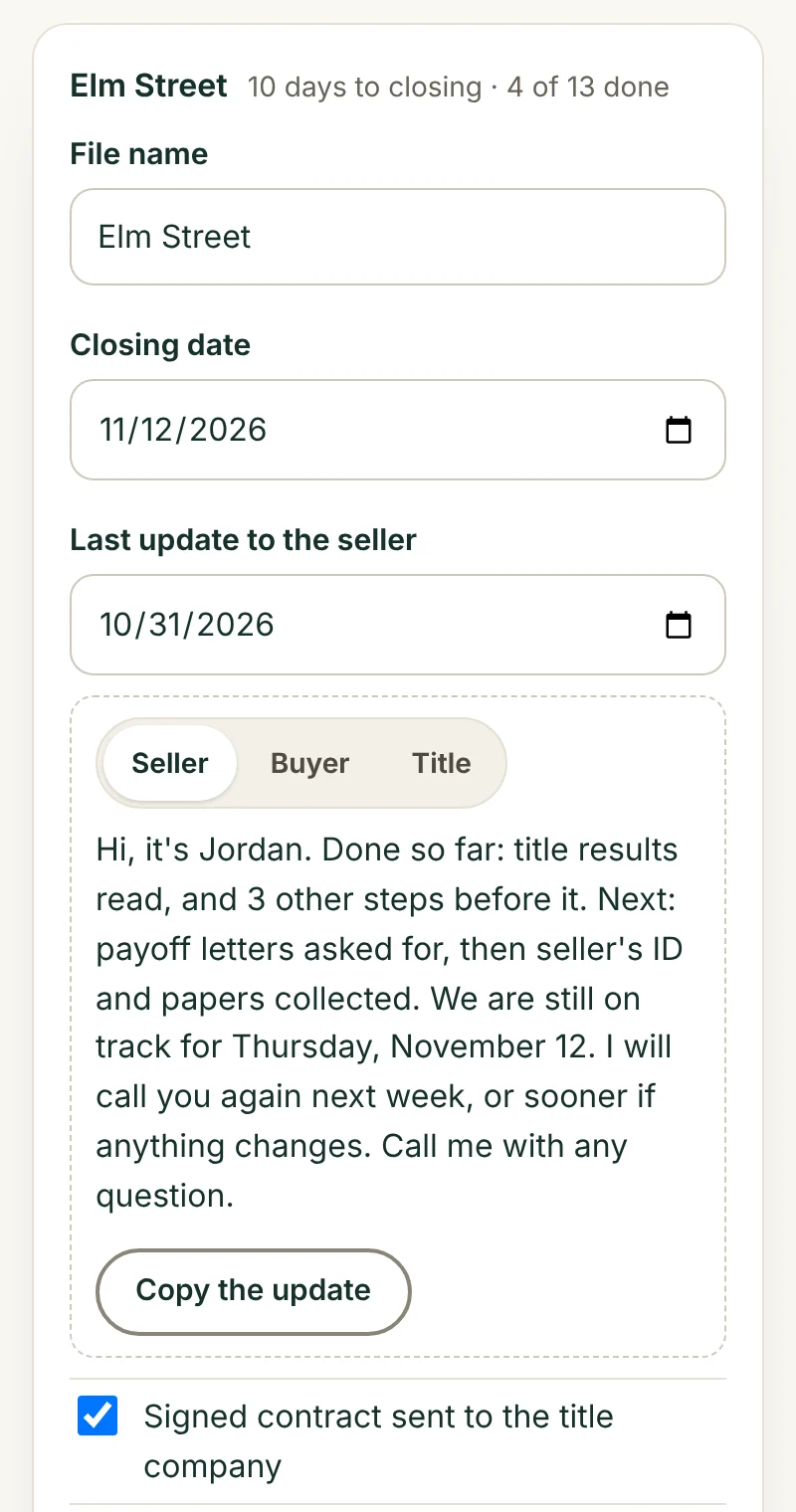
The checklist
The 13 steps, from signed contract to funded
- Signed contract sent to the title company
- Earnest money in, if the contract has it
- Title search ordered
- Title results read: liens, judgments, names that need to sign
- Payoff letters asked for
- Seller's ID and papers collected
- Buyer or assignee confirmed, with proof of funds
- Final walk-through set
- Closing time and place confirmed with the seller
- Seller told what to bring
- Keys and utilities plan agreed
- Closing statement gone over with the seller
- Closed and funded
Steps differ by market and title company. Ask your title company what they need, and add it to your notes.
A worked example
A status update, written from the checklist
A made-up file called Elm Street: 10 days to closing · 4 of 13 done. The checklist writes the update from what is done and what comes next, and words it for the seller, the buyer or the title company.
Hi, it's Jordan. Done so far: title results read, and 3 other steps before it. Next: payoff letters asked for, then seller's ID and papers collected. We are still on track for Thursday, November 12. I will call you again next week, or sooner if anything changes. Call me with any question.
Hi, Jordan here about Elm Street. Done so far: title results read, and 3 other steps before it. Next: payoff letters asked for, then seller's ID and papers collected. We are still on track for Thursday, November 12. Questions any time.
Hi, this is Jordan on the Elm Street file. Done so far: title results read, and 3 other steps before it. Next: payoff letters asked for, then seller's ID and papers collected. We are still on track for Thursday, November 12. Let me know if you need anything from us.
The entries are made up. The picture of the tool on this page shows the same ones.
How to use it
How to use the contract-to-close checklist
Add a file for each signed deal
Press Add a file, name it by the street, and put in the Closing date and the day of the Last update to the seller.
Tick each step as it happens
The file shows the days to closing and how many of the 13 steps are done.
Copy the update
Pick Seller, Buyer or Title, press Copy the update, read it once and send it yourself.
Call the seller when it says so
After 7 days with no update, the file tells you to call the seller that day, even if there is no news.
Before you type anything
- It opens with no sign-up. Until you sign in, what you type stays in your browser.
- A free account saves it and brings it to your other devices. Have an account already? Sign in before you start typing.
- Your team lead and the business owner do not see what you type in a tool.
- It uses no AI. It is a form, a checklist or arithmetic that runs in your browser.
What it is not
- It does not send anything. You copy the update and send it.
- It does not hold contracts or other documents, and it is not a title or closing service.
- It does not replace your CRM. Full records, phone numbers and documents belong there.
- Like the lessons, it is general. It is not legal advice, and steps differ by market.
Practice the talk
Use it on a made-up call
The contract-to-close checklist gets the facts ready. The call is where they get used. Play three turns with Grace, one of the made-up people in the app.
- The other person is made up and answers what you pick.
- Trust goes up or down, and a coach note says why after each line.
- No sign-up, and nothing you pick is saved.
Three turns from Coordinator 1, deal calls, on the coordinator path. Pick what you would say.
The job behind the tool
Made for a transaction coordinator and an acquisitions rep
Climbmark is practice for the jobs on a home-buying or wholesaling team, and each of these jobs has a free path of short levels with practice calls.
Transaction coordinator
For the person who takes a signed deal to closing.
See the coordinator pathAcquisitions rep
For the closer who walks the house and makes the offer.
See the acquisitions pathPractice the skill behind it. "Contract to title" is level 1 of the coordinator path, and it needs no sign-up. Three chapters, about 45 to 60 minutes, and you can stop after any chapter. Once the contract is signed, open title the same day, track every item on the checklist, and keep the seller in the loop so nothing surprises anyone.
Goes well with
Tools for the weeks around a closing
Questions
About the contract-to-close checklist
More answers are in the questions and answers. You can also ask about transaction coordination in the community.
What are the steps from contract to close?
The checklist has 13: signed contract sent to the title company; earnest money in, if the contract has it; title search ordered; title results read: liens, judgments, names that need to sign; payoff letters asked for; seller's ID and papers collected; buyer or assignee confirmed, with proof of funds; final walk-through set; closing time and place confirmed with the seller; seller told what to bring; keys and utilities plan agreed; closing statement gone over with the seller; closed and funded. Steps differ by market and by title company, so ask your title company what they need.
How often should the seller hear from you before closing?
The checklist works on a weekly update. When the seller has not heard from you in 7 days, the file shows a reminder to call them that day, even if there is no news. The update it writes for the seller ends with when you will call again.
Can I track several deals at once?
Yes. Each signed deal gets its own file, with its own closing date and steps. The list holds up to 40 files.
Does the checklist send updates to the seller or the title company?
No. It writes the update and you copy it. Read it once, then send it by text or email the way you do today.
Does it work when the contract is assigned to another buyer?
One of the steps is to confirm the buyer or the assignee, with proof of funds. The other steps are ones most cash deals share. Your contract, your market and your title company decide the rest, so check with your title company. This is not legal advice.
Is the contract-to-close checklist free?
Yes. The contract-to-close checklist is on every plan, and that includes the free plan. It opens in your browser with no sign-up, and nothing in it is counted or capped.
Who can see what I type in the contract-to-close checklist?
Until you sign in, what you type stays in your browser. With a free account it is kept with your own progress, and the app shows it to nobody else. Your team lead and the business owner see practice results, such as levels passed. They do not see your tool entries.
Open a file for your next signed deal
Tick the first step, and the checklist counts the days from there.