Job tool · free
Wholesale deal calculator: the highest offer that still works
Start from what the house should sell for once it is fixed up. Take off the repairs, the cost of holding it, the closing and selling costs, and the profit your team needs. What is left is the most you can pay. Many investors call that number the maximum allowable offer, or MAO.
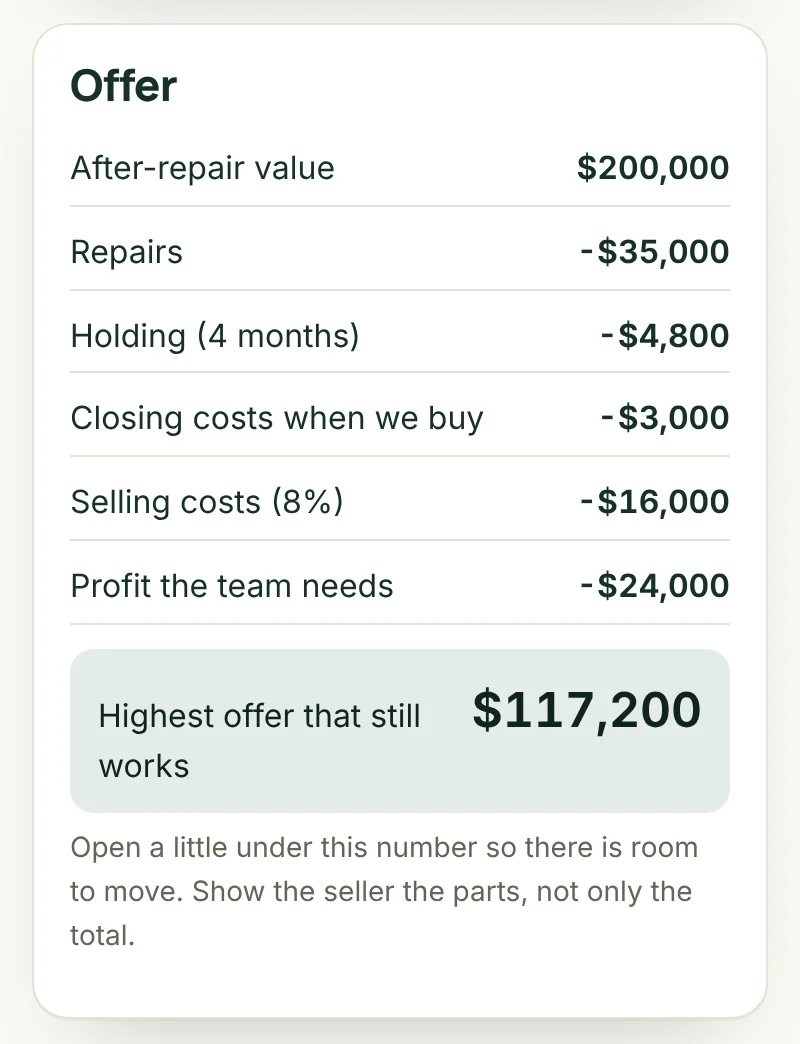
The calculator could not start in this browser. Loading the page again can help. The sum itself is short: the after-repair value, minus repairs, holding costs, closing costs, selling costs and the profit your team needs. With the sample numbers that is $200,000 minus $35,000, $4,800, $3,000, $16,000 and $24,000, which leaves $117,200.
What it does
The same calculator, kept in the app
The calculator does one sum, and it shows every line of it. You can see where the offer comes from, and you can show the seller.
The calculator on this page and the one in the app add up the same way. The one in the app keeps your numbers, so you can come back to a deal, and offer talk prep reads them to write what you say to the seller.
- You put in
- The after-repair value, the repairs, how many months you will hold the house and what each month costs, closing costs when you buy, selling costs, and the profit your team needs as a percent or a dollar amount.
- You get
- Highest offer that still works, with every cost on its own line. It warns you when the numbers do not work, and it points out a cost you left blank.
The inputs
Where each number comes from
An offer is only as good as the value and the repair estimate under it. The other boxes are your team's own costs and profit.
- After-repair value
- What the house should sell for once the work is done. It comes from recent sales of houses like this one that were already fixed up.
- Repairs
- What the work will cost. It comes from your visit, or from a contractor's bid.
- Months you will hold it
- From the day you buy to the day it sells: the work, and then the time on the market.
- Holding cost a month
- What it costs to own the house each month until it sells.
- Closing costs when we buy
- Title and closing fees on the purchase. Your title company can tell you what is usual.
- Selling costs, % of value
- The agent and the closing costs when the house sells, as a percent of the value.
- Profit the team needs, % of value
- Your team's own target, as a percent of the value.
- Or profit as a dollar amount
- A profit in dollars. When this box is filled in, the percent is not used.
The result
How to read the result
- When the number is above zero
- Open a little under this number so there is room to move. Show the seller the parts, not only the total.
- When the number is zero or less
- The calculator says so in plain words: The numbers don't work at this value. Check the repairs and the comps before you go back to the seller.
- When a cost is left blank
- A blank cost counts as zero, so the offer shows higher than it should. The calculator names what is blank: repairs, selling costs or profit.
How to use it
How to use the deal calculator
Start with the value
Put in the After-repair value: what houses like this one sold for nearby, once they were fixed up.
Take off the costs
Add Repairs from your visit, the Months you will hold it and the Holding cost a month, the Closing costs when we buy and the selling costs as a percent of the value.
Set the profit
Put in the profit your team needs as a percent of the value, or as a dollar amount. When the dollar amount is filled in, it is used instead of the percent.
Read the offer
Highest offer that still works shows with each cost on its own line. Open a little under it, so there is room to move.
Before you type anything
- It opens with no sign-up. Until you sign in, what you type stays in your browser.
- A free account saves it and brings it to your other devices. Have an account already? Sign in before you start typing.
- Your team lead and the business owner do not see what you type in a tool.
- It uses no AI. It is a form, a checklist or arithmetic that runs in your browser.
What it is not
- It is not an appraisal. The after-repair value is yours to back up with comps.
- It does not look up comps or price repairs. Those two numbers come from you.
- It does not replace your CRM. Full records, phone numbers and documents belong there.
- Like the lessons, it is general. It is not legal advice, and steps differ by market.
Practice the talk
Use it on a made-up call
The deal calculator gets the facts ready. The call is where they get used. Play three turns with Boyd, one of the made-up people in the app.
- The other person is made up and answers what you pick.
- Trust goes up or down, and a coach note says why after each line.
- No sign-up, and nothing you pick is saved.
Three turns from Deal analyst 1, deal calls, on the deal analyst path. Pick what you would say.
The job behind the tool
Made for a deal analyst, an acquisitions rep and a dispo rep
Climbmark is practice for the jobs on a home-buying or wholesaling team, and each of these jobs has a free path of short levels with practice calls.
Deal analyst
For the person who runs the numbers on each house.
See the deal analyst pathAcquisitions rep
For the closer who walks the house and makes the offer.
See the acquisitions pathDispo rep
For the person who sells the team's deals to cash buyers.
See the dispositions pathPractice the skill behind it. "Running the numbers" is level 1 of the deal analyst path, and it needs no sign-up. Three chapters, about 45 to 60 minutes, and you can stop after any chapter. An offer is only as good as the comps and the repair estimate under it. Pick comps you can defend, check the repairs, and show your math so the team can trust the number.
Goes well with
Tools for before and after the number
Questions
About the deal calculator
More answers are in the questions and answers. You can also ask about deal analysis in the community.
What is the highest offer that still works?
It is the most a team can pay for a house and still cover its costs and its profit. The deal calculator starts from the after-repair value and takes off repairs, holding costs, closing costs, selling costs and the profit the team needs. Many investors call this number the maximum allowable offer, or MAO.
How is the deal calculator different from the 70% rule?
The 70% rule is a shortcut: offer no more than 70% of the after-repair value, minus repairs. It rolls every other cost and the profit into one percent. The deal calculator puts each cost on its own line and uses your team's own numbers, so you can see where the offer comes from and show the seller.
What is after-repair value (ARV)?
It is what the house should sell for once the repairs are done. It comes from like-for-like comps: recent sales of houses like this one, nearby, that were already fixed up. The calculator does not look comps up. You put the value in.
Can I use the deal calculator for a wholesale deal?
Yes. Fill in the costs the way your end buyer will see them. Then put the profit your buyer needs plus your own fee in Or profit as a dollar amount. The result is the most you can pay the seller and still leave room for both.
What counts as a holding cost?
What it costs to own the house each month until it sells: the loan, taxes, insurance and utilities. The calculator multiplies that monthly cost by the months you expect to hold the house.
What if I leave a cost blank?
A blank cost counts as zero. The calculator tells you when repairs, selling costs or profit are blank, because the offer then shows higher than it should.
Does the calculator on this page save my numbers?
No. The calculator on this page keeps nothing and sends nothing. Close the page and the numbers are gone. The same calculator in the app keeps your numbers in your browser, and a free account saves them to your account.
Is the result an appraisal or advice?
No. It is arithmetic on the numbers you put in. With the sample numbers, $200,000 of value leaves $117,200 after the costs and the profit. Change one number and the result changes with it.
Is the deal calculator free?
Yes. The deal calculator is on every plan, and that includes the free plan. It opens in your browser with no sign-up, and nothing in it is counted or capped.
Who can see what I type in the deal calculator?
Until you sign in, what you type stays in your browser. With a free account it is kept with your own progress, and the app shows it to nobody else. Your team lead and the business owner see practice results, such as levels passed. They do not see your tool entries.
Run the numbers on your next house
Use the calculator on this page, or open it in the app to keep the numbers and turn them into the offer talk.