Job tool · free
Compare contractor bids on the same scope of work
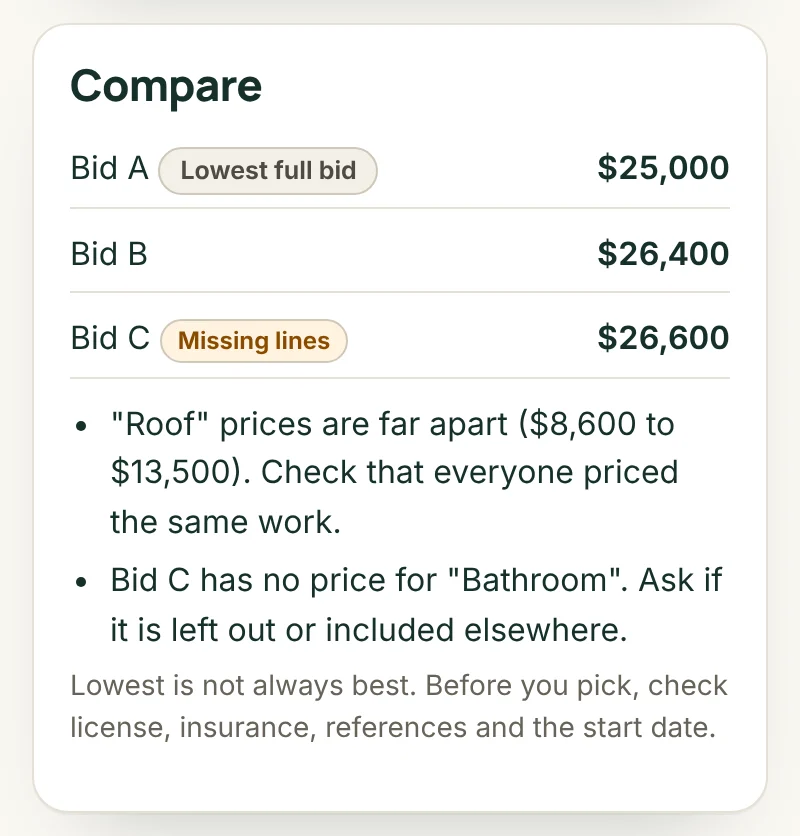
Write the scope of work once, with one line for each piece of work. Put in what each contractor charges for each line. The sheet adds up each bid, flags a line somebody left out and flags prices that are far apart.
It opens in your browser with no sign-up. What you type stays in your browser until you make a free account.
What it does
What you put in, and what you get
Two bids only compare when they price the same work. The sheet has every contractor price the same lines, so a total that looks low because a line is missing does not win by mistake.
It compares up to three bids on a scope of up to 20 lines.
- You put in
- The scope of work, one line for each piece (up to 20 lines), and what each contractor charges for each line. It compares up to three bids.
- You get
- A total for each bid, a flag where a contractor left a line without a price, and a flag where two prices for the same line are far apart. The cheapest bid gets a Lowest full bid mark, and only a bid that priced every line can get it.
What it checks
What the sheet checks for you
- A total for each bid
- Each bid is added up line by line, so you compare the whole job.
- Missing lines
- A bid with no price for a line gets this mark, and the sheet names the line. A missing line makes a total look lower than it is.
- Prices that are far apart
- When the highest price for a line is at least one and a half times the lowest, the sheet flags the line, so you can check that everyone priced the same work.
- Lowest full bid
- The lowest total gets this mark only when that bid priced every line, and only when at least two bids did.
How to use it
How to use the scope and bid compare
Write the scope first
One line per piece of work. Every contractor prices the same lines, so the totals compare fairly.
Name the bids and put in the prices
Each bid has a box for the contractor's name. Type what each one charges for each line, and leave a box empty when a contractor gave no price.
Read the totals and the flags
The sheet marks the Lowest full bid and any bid with Missing lines, and it lists the lines where prices are far apart.
Ask before you pick
Ask each contractor about every flag. Then check license, insurance, references and the start date, because the lowest bid is not always the best one.
Before you type anything
- It opens with no sign-up. Until you sign in, what you type stays in your browser.
- A free account saves it and brings it to your other devices. Have an account already? Sign in before you start typing.
- Your team lead and the business owner do not see what you type in a tool.
- It uses no AI. It is a form, a checklist or arithmetic that runs in your browser.
What it is not
- It does not check a contractor's license, insurance or references. That check is yours.
- It does not price the work. The prices come from the contractors.
- It does not replace your CRM. Full records, phone numbers and documents belong there.
- Like the lessons, it is general. It is not legal advice, and steps differ by market.
Practice the talk
Use it on a made-up call
The scope and bid compare gets the facts ready. The call is where they get used. Play three turns with Rudy, one of the made-up people in the app.
- The other person is made up and answers what you pick.
- Trust goes up or down, and a coach note says why after each line.
- No sign-up, and nothing you pick is saved.
Three turns from Project manager 1, calls, on the project manager path. Pick what you would say.
The job behind the tool
Made for a project manager and a deal analyst
Climbmark is practice for the jobs on a home-buying or wholesaling team, and each of these jobs has a free path of short levels with practice calls.
Project manager
For the person who runs the rehab on a flip or a rental.
See the project manager pathDeal analyst
For the person who runs the numbers on each house.
See the deal analyst pathPractice the skill behind it. "Scope and bids" is level 1 of the project manager path, and it needs no sign-up. Three chapters, about 45 to 60 minutes, and you can stop after any chapter. A rehab goes the way its scope goes. Write what gets done room by room, get bids you can compare line by line, and tie every payment to finished work.
Goes well with
Tools for the rest of the rehab
Questions
About the scope and bid compare
More answers are in the questions and answers. You can also ask about rehab and projects in the community.
How do I compare contractor bids fairly?
Give every contractor the same written scope, with one line for each piece of work, and ask for a price on each line. Then the totals cover the same work, and a missing line or a price far from the others shows up at once.
Is the lowest bid the best one?
Not always. The sheet gives the "Lowest full bid" mark only to a bid that priced every line, because a bid that leaves work out looks lower than it is. Before you pick, check license, insurance, references and the start date.
What does "Missing lines" mean on a bid?
That contractor gave no price for at least one line of the scope. The sheet names the line. Ask whether the work is left out or included in another line.
When does the sheet say two prices are far apart?
When the highest price for a line is at least one and a half times the lowest. The sheet then tells you to check that everyone priced the same work.
How many bids and lines can I compare?
Up to three bids, on a scope of up to 20 lines.
Is the scope and bid compare free?
Yes. The scope and bid compare is on every plan, and that includes the free plan. It opens in your browser with no sign-up, and nothing in it is counted or capped.
Who can see what I type in the scope and bid compare?
Until you sign in, what you type stays in your browser. With a free account it is kept with your own progress, and the app shows it to nobody else. Your team lead and the business owner see practice results, such as levels passed. They do not see your tool entries.
Line up the bids for your next rehab
Write the scope once, and every bid after that is priced line by line.