Job tool · free
New hire ramp plan: the first 30 days, with dates
Put in the new hire's name, the start date and the job. The plan spreads that job's practice levels over the first weeks, three at most, with a check-in at the end of each week, and ends with a week of live work and a ready check.
It opens in your browser with no sign-up. What you type stays in your browser until you make a free account.
What it does
What you put in, and what you get
The plan is built on the practice levels in Climbmark. Pick the job, and it lays that job's levels over the calendar from the start date.
Times come from the levels themselves. Move a week if the rep needs it; passing the level is what counts, not the date.
- You put in
- The new hire's name, start date and job path.
- You get
- A 30-day plan with dates: the levels to play each week, a check-in at the end of each week and a ready check in the last one. It prints.
A worked example
A sample plan for a dispo rep who starts on a Monday
A made-up new hire called Nia.
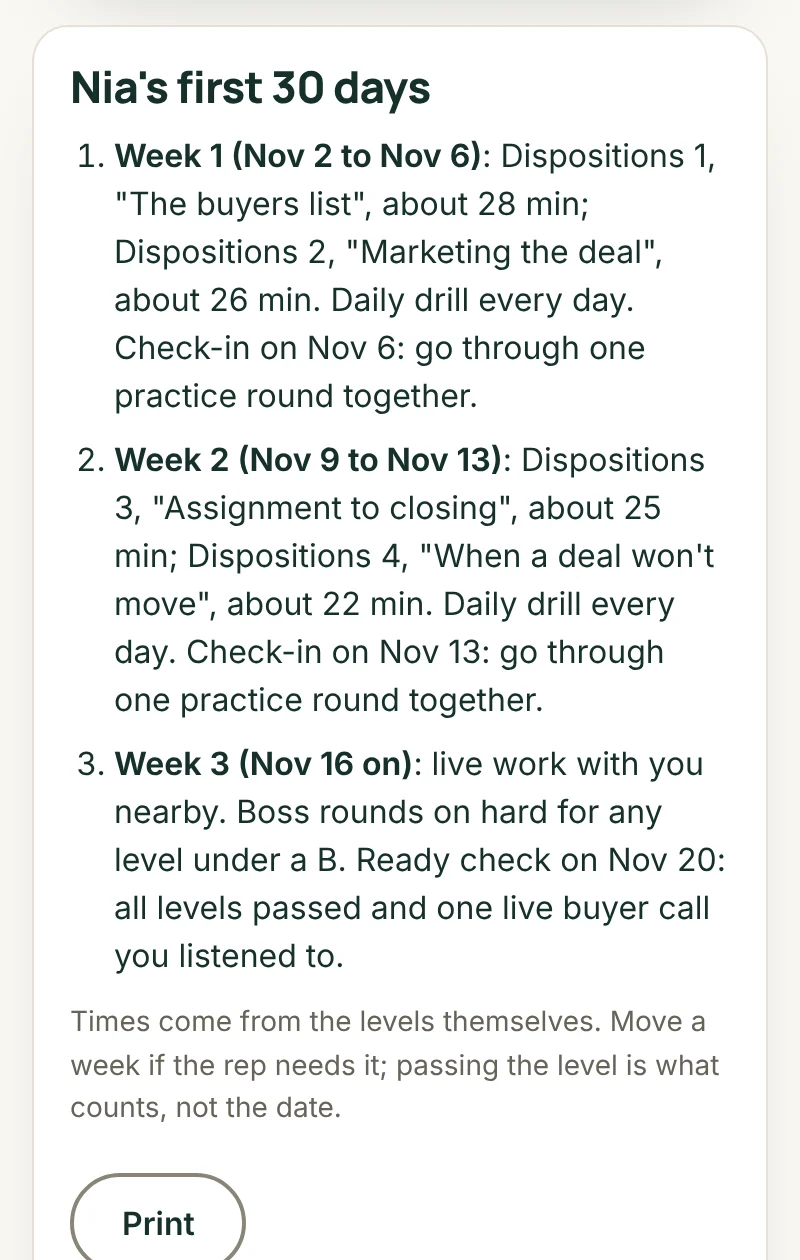
- Week 1 (Nov 2 to Nov 6): Dispositions 1, "The buyers list", about 50 to 65 min; Dispositions 2, "Marketing the deal", about 50 to 60 min. Daily drill every day. Check-in on Nov 6: go through one practice round together.
- Week 2 (Nov 9 to Nov 13): Dispositions 3, "Assignment to closing", about 50 to 60 min; Dispositions 4, "When a deal won't move", about 50 to 65 min. Daily drill every day. Check-in on Nov 13: go through one practice round together.
- Week 3 (Nov 16 to Nov 20): Dispositions 5, "Deals with other wholesalers", about 50 to 65 min; Dispositions 6, "When a buyer backs out", about 50 to 60 min. Daily drill every day. Check-in on Nov 20: go through one practice round together.
- Week 4 (Nov 23 on): live work with you nearby. Boss rounds on hard for any level under a B. Ready check on Nov 27: all levels passed and one live buyer call you listened to.
The entries are made up. The picture of the tool on this page shows the same ones.
How it is built
What every plan has
- Up to three weeks of levels
- The job's levels are split over the first weeks, three at most, with the daily drill every day.
- A check-in each week
- At the end of each week you go through one of the new hire's practice rounds together.
- A week of live work
- Live work with you nearby. Boss rounds on hard for any level under a B.
- A ready check
- All levels passed, and one piece of live work that you listened to or looked at.
How to use it
How to use the new hire ramp plan
Put in three facts
New hire, Start date and Path, which is the job the person was hired for.
Read the plan
Each week lists the levels to play, how long each one takes and the day of the check-in.
Share it
Print it for the new hire. To put the levels on their list in the app, use the team page.
Move a week when you need to
The dates are a plan. Passing the level is what counts.
Before you type anything
- It opens with no sign-up. Until you sign in, what you type stays in your browser.
- A free account saves it and brings it to your other devices. Have an account already? Sign in before you start typing.
- Your team lead and the business owner do not see what you type in a tool.
- It uses no AI. It is a form, a checklist or arithmetic that runs in your browser.
What it is not
- It does not put the levels on the rep's list by itself. Assigning a level is done on the team page in the app.
- It does not promise that a rep is ready on day 30. The ready check is yours to make.
- It does not replace your CRM. Full records, phone numbers and documents belong there.
- Like the lessons, it is general. It is not legal advice, and steps differ by market.
Practice the talk
Use it on a made-up talk
The new hire ramp plan gets the facts ready. The talk is where they get used. Play three turns with Eli, one of the made-up people in the app.
- The other person is made up and answers what you pick.
- Trust goes up or down, and a coach note says why after each line.
- No sign-up, and nothing you pick is saved.
Three turns from Team lead 2, new rep talks, on the team lead path. Pick what you would say.
The job behind the tool
Made for a team lead
Climbmark is practice for the jobs on a home-buying or wholesaling team, and this job has a free path of short levels with practice calls.
Practice the skill behind it. "Ramping a new rep" is level 2 of the team lead path. Three chapters, about 45 to 55 minutes, and you can stop after any chapter. A new rep on live leads too early burns leads and confidence. Too late, and they get bored. Learn the 30-day ramp, read who is ready, and say it plainly to the business owner.
Questions
About the new hire ramp plan
More answers are in the questions and answers. You can also ask about hiring and training in the community.
What should a new rep's first 30 days look like?
In this plan: up to three weeks of short practice levels, with the daily drill every day and a check-in at the end of each week. Then a week of live work with you nearby. It ends with a ready check: all levels passed, and one piece of live work that you listened to or looked at.
Which jobs can I make a plan for?
Any of the twelve job paths in Climbmark: lead manager, acquisitions rep, dispo rep, follow-up specialist, cold caller, transaction coordinator, team lead, deal analyst, project manager, marketing manager, operations and CRM admin and rental manager.
Does the plan depend on the start date?
Yes. Each week counts from the date you put in, and each check-in falls four days after its week starts. Start on a Monday, and the check-ins fall on Fridays.
How long do the levels take?
Each level says how long it takes, and the plan shows that next to the level. On the dispo rep path a level takes 50 to 65 minutes.
What is the ready check?
The last step of the plan: all levels passed, and one piece of live work that you listened to or looked at. Until then, the plan keeps the new rep on live work with you nearby.
Is the new hire ramp plan free?
Yes. The new hire ramp plan is on every plan, and that includes the free plan. It opens in your browser with no sign-up, and nothing in it is counted or capped.
Who can see what I type in the new hire ramp plan?
Until you sign in, what you type stays in your browser. With a free account it is kept with your own progress, and the app shows it to nobody else. Your team lead and the business owner see practice results, such as levels passed. They do not see your tool entries.
Plan your next hire's first month
Put in the name, the start date and the job, and print the plan for day one.